
Push notifications are short, clickable messages sent from an app or website to a user’s device, even when the app or site isn’t open. In plain language: a server “pushes” an alert to your phone or browser through a platform service (Apple, Google, or a web push service), and your device displays it in the notification area. If you’ve ever received a flight update, a delivery status ping, or a breaking-news alert, that’s a push notification.
Summary: Push notifications are permission‑based alerts delivered to a device via APNs/FCM/Web Push. They work by obtaining permission, registering a token/subscription, and sending a payload through the platform’s push service. Use channels/categories, right‑time prompts, and responsible targeting to boost engagement while respecting privacy and user control.
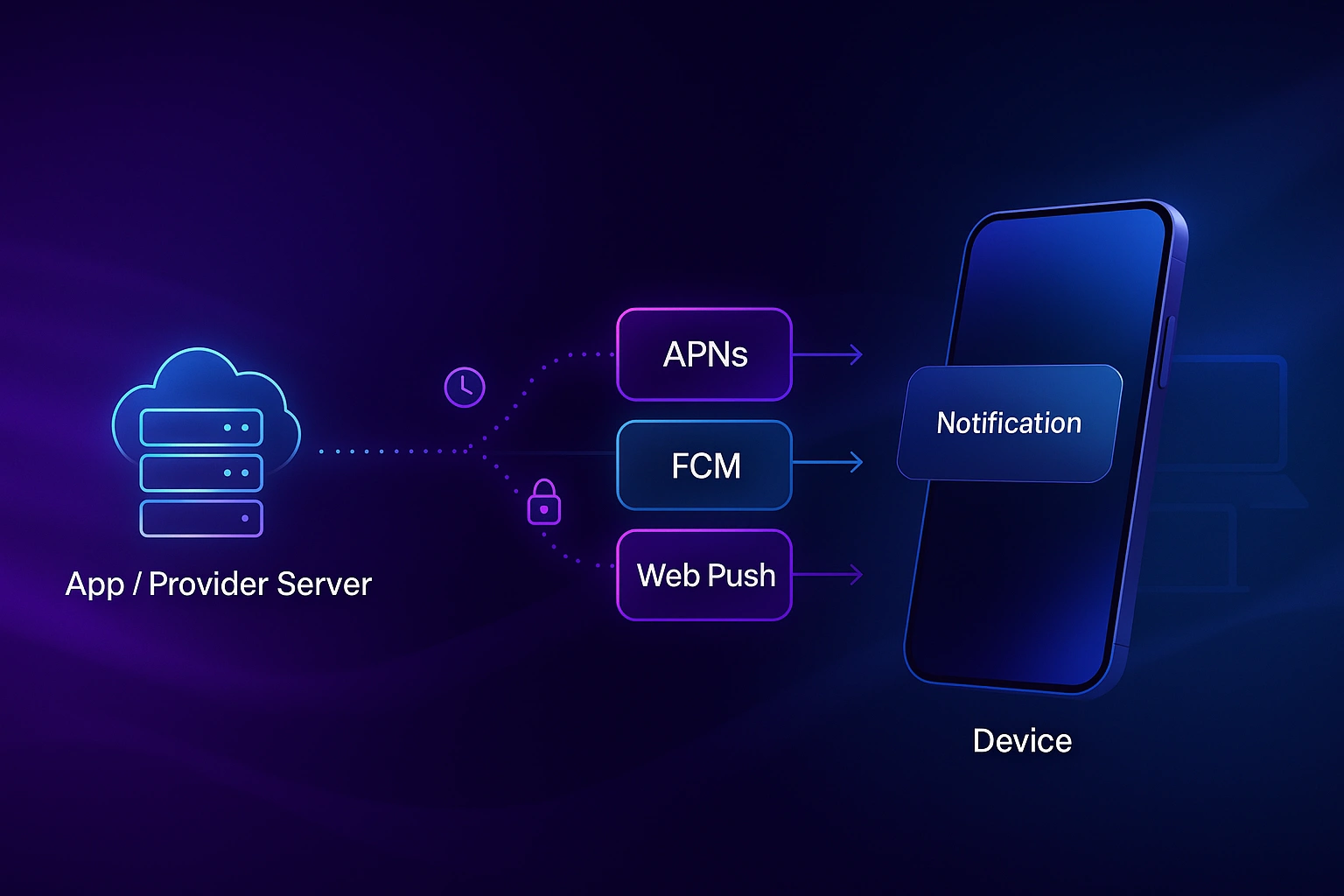
A push notification is a message delivered from a provider server to a user’s device via a platform push service such as Apple Push Notification service (APNs) on iOS, Firebase Cloud Messaging (FCM) on Android and the web, or a standards‑based Web Push service in modern browsers. It appears outside your app/site UI (lock screen, notification center, or browser UI) and can include actions (e.g., “Reply,” “Track order”).
At a high level, push involves four moving parts:
iOS: Your server connects to APNs over HTTP/2 with TLS 1.2+, authenticates, and sends a JSON payload including an aps dictionary (alert, badge, sound) plus optional custom data. iOS displays the notification or passes it to your app extension for richer presentation. Headers like apns-priority and apns-expiration influence delivery urgency and time‑to‑live.
Android: FCM issues registration tokens to devices. Your server targets tokens, topics, or conditions with notification (display) or data messages, sets priority (normal vs. high), and optionally TTL. The Android OS renders notifications and honors notification channels and importance levels for interruption control.
On the web, a Service Worker “listens” for push events. After a user grants permission, your site stores a PushSubscription (endpoint + public keys). Your server sends a request using the Web Push protocol with VAPID identification, and the payload is encrypted end‑to‑end (application server → browser) per IETF specs. TTL and urgency headers control queuing behavior.
Done well, push drives re‑engagement, task completion, and revenue, especially for time‑sensitive, one‑tap actions (e.g., “Your order is arriving,” “Gate changed,” “Flash sale ends in 2 hours”). Third‑party benchmarks show opted‑in users often buy more: in Airship’s 2025 report, customers opted in to push made ~13% more purchases on average than those opted out; top performers saw up to 39% more. Direct open rates stayed relatively steady year‑over‑year despite permission changes.
Examples by vertical (not exhaustive):
Real‑time updates tied to an action or event (shipment, password reset, ride arrival). Typically high priority; respect quiet hours where applicable.
Onboarding nudges, streak savers, renewal reminders, cart recovery—all triggered by user behavior and lifecycle milestones. Pair with segmentation and preferences to avoid fatigue. (Airship reports sizable lifts when brands personalize & segment.)
Sales, launches, limited‑time offers. Use frequency caps, send‑time testing, and channels/categories so users can tune the intensity.
Invisible “data” messages (Android) or background notifications (iOS) that refresh content without alerting the user; delivery isn’t guaranteed and is de‑prioritized for battery health.
Include images, video, or audio (e.g., product photo, trailer). Use iOS UNNotificationAttachment or Android BigPictureStyle.
Time‑to‑live (TTL): Messages queue if a device is offline; they’re dropped after TTL expires. On web push, set TTL in the request; on FCM use the message lifespan; on APNs use apns-expiration. Use longer TTL for evergreen prompts (e.g., “verify email”), short TTL for perishable alerts (e.g., “driver is here”).
Priority/urgency: On Android, choose high vs. normal priority; on web push, set Urgency; on APNs set apns-priority (e.g., 10 immediate, 5 power‑aware). Use high priority sparingly; misuse can lead to deprioritization.
Collapsing & topics: Collapse keys replace older queued alerts of the same type (e.g., “score update”), and topic messaging lets you fan‑out to subscribers (e.g., “weather:seattle”).
Pro tip: Don’t rely on push for life‑critical scenarios (emergency alerts, medical devices). FCM explicitly disallows high‑risk uses; delivery is best‑effort.
Ask at the right moment with clear context and value. Since Android 13 added a runtime permission and browsers increasingly quiet spammy prompts, your pre‑prompt UX and timing matter more than ever. Pair an educational screen with a single, contextual benefit (“Enable order updates so we can notify you when your courier is nearby”), then show the system dialog. On the web, avoid prompting on first visit; use an in‑page explainer and intent‑based triggers.
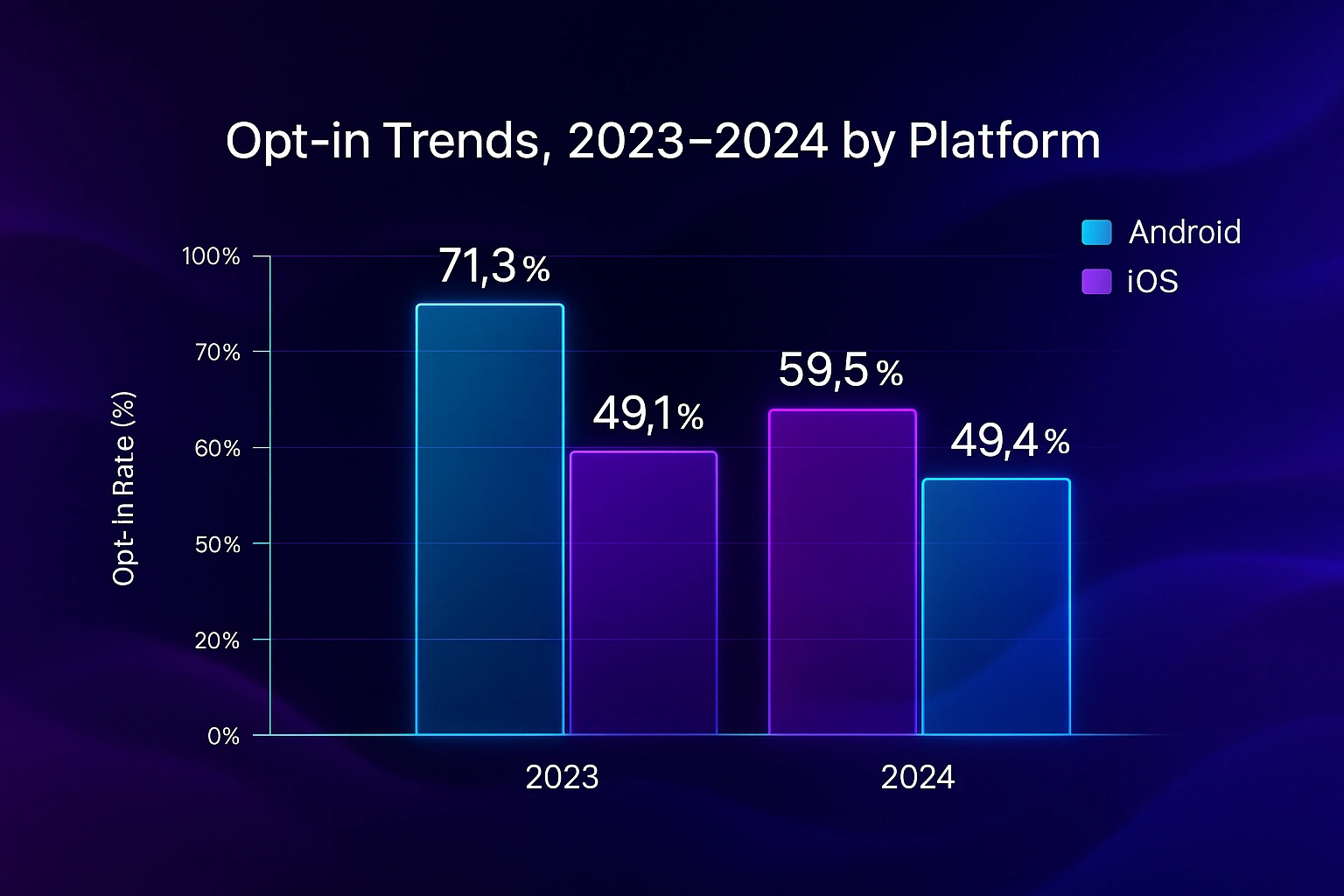
Expect declining “default” Android opt‑ins post‑Android 13; recent industry data shows Android opt‑ins dropping while iOS remains steadier, so invest in segmentation and value messaging.
Transport security: APNs requires HTTP/2 over TLS; FCM uses secure connections; and Web Push payloads are encrypted end‑to‑end per RFC 8291, with VAPID to identify your server. This means intermediaries (including push services) can’t read your web push content.
Metadata awareness: Push involves device tokens/subscription endpoints. In late 2023–2024, news reports highlighted that governments can request push metadata from platform providers; content is not included, but tokens and app identifiers may be. Design your data handling accordingly.
Consent & privacy laws: Push relies on platform permission, but privacy laws (GDPR/CCPA and others) still apply to any personal data you process (e.g., user IDs, behavioral segments). Follow regulator guidance: obtain informed consent when required, explain purposes, provide easy opt‑out, and honor data access/deletion rights. Work with counsel for your situation.
Ask for permission only after a meaningful interaction. On Android, align with onboarding; on web, gate the prompt behind a user action (e.g., “Track my package”). Chrome also auto‑revokes permissions for sites with low engagement—another reason to keep messages genuinely useful.
Use topics, preferences, and user attributes. Brands that personalize & segment see higher open rates and attributed purchases in recent benchmarks.
Use Android Notification Channels with sensible defaults; map iOS notification categories to actions users expect; offer in‑app controls to fine‑tune frequency (e.g., “Deals: weekly”).
Prefer “normal” priority, short TTL for perishable alerts, and collapse keys for rapidly updating topics (scores, delivery ETAs). Test in Doze/low power scenarios.
Write like a headline: 35–90 characters, one idea, one verb. Add media only when it clarifies. Use clear CTAs in action buttons. (Apple/Google design systems provide concrete text and behavior guidance.)
Pro tip: Treat notifications as a feed you curate. If you wouldn’t want 5 of your own messages in a row, neither will your users. Apply send‑time caps, cool‑downs, and suppression when signals are weak.
A short, clickable alert sent from a server via APNs/FCM/Web Push to your device, shown outside the app/site UI.
“Push” means the service delivers (pushes) messages to the device without the device repeatedly “pulling” (polling) for updates. Web push uses a standard protocol; mobile push uses APNs/FCM.
Users grant permission, your site saves a PushSubscription, and your server sends an encrypted message via the Web Push protocol to the browser’s push service. A Service Worker handles the push event and shows a notification.
Yes, transport is secured (APNs/FCM over TLS), and web push encrypts payloads end‑to‑end per RFC 8291.
FCM is free; APNs is included with Apple’s developer ecosystem. You may pay for third‑party vendors that add orchestration, A/B testing, and analytics.
Push services queue messages until the device is online, up to the TTL you set. After TTL expires, the message is dropped.
iPhone: Settings → Notifications → choose the app → toggle Allow Notifications off. Android: Settings → Notifications → App notifications → turn an app off or adjust channels.
iOS/iPadOS 16.4+ support Web Push for Home Screen web apps (PWAs); users must install the web app and grant permission.
Push relies on app or browser permission and an internet path via APNs/FCM/Web Push; SMS goes via carrier networks to a phone number. Push is free to send through platform services (e.g., FCM), while SMS carries per‑message costs and compliance requirements.
Push is delivered outside the app (system UI). In‑app messages appear only when the app is open and are rendered by your app’s UI layer, useful for onboarding and feature tips.
Web push payloads are encrypted per RFC 8291; mobile transports use TLS in transit. Don’t include secrets in notification bodies, and minimize personal data.
Yes. Chrome introduced a quieter permission UI and now auto‑revokes notification permissions for low‑engagement sites sending many alerts.
Android channels let users control interruption level per topic; iOS categories define actions and help organize types. Implement both to give users fine‑grained control.
In short, a push notification is a fast, permission‑based alert delivered via APNs, FCM, or Web Push to help people act on timely information. Master the basics (permission timing, channels/categories, priority/TTL), personalize with restraint, and stay compliant with privacy laws. If you keep the user’s goal at the center, push becomes a durable engagement lever—not just another interruption.
Like this guide? Share it with your team, leave a comment with your use case, or explore related deep dives on consent UX and notification copywriting
From branding to digital solutions, let’s take your business to the next level together.